 Tools
ToolsTimeline Maker
Create a timeline from project milestones, historical events, company moments, campaign dates, or lesson notes. Add the key dates, arrange the sequence, and shape the result into a visual timeline on canvas.

Transform your complex project schedules into clear, actionable visual timelines
Our dynamic template helps teams turn high-level strategy into a clear, testable project direction. Whether you need a blank timeline template to start fresh or are looking to format a timeline project for a specific presentation, this tool provides the necessary structure. It is designed for those moments when a team has many moving parts but has not yet aligned on the critical path.
Product, design, and GTM teams use this shared structure to keep complex discussions visible. It is the perfect solution if you are searching for how to make a timeline template that is flexible and scalable. Teams often ask does Excel have a timeline template or does Google Docs have a timeline template; our workspace provides a more integrated, AI-driven alternative to those static options.
This template features structured milestone mapping with dedicated sections for project phases and deadlines. It offers versatile design options and includes AI-enhanced synthesis to automatically summarize notes and update task statuses. These combined tools provide a flexible and scalable framework for managing complex project timelines.
Use this template when your team is exploring a new feature, preparing a roadmap item, or reviewing project status signals before committing engineering time. It is effective for teams looking for how to make a simple timeline that can handle high-complexity projects.
Click "Use Template" to open a new canvas with a timeline prompt already prepared.
Edit the project purpose, milestones, timeline scope, and campaign goals to match your specific situation.
Create a structured timeline canvas with sections for weekly, monthly, quarterly, or yearly progress to map out events and priorities.
Ask follow-up questions, add custom media, or adjust the project details and action statuses as your strategy evolves.
Skip the frustration of staring at a daunting blank canvas—our templates do the foundational setup work for you right away.
Track your progress without getting lost in spreadsheet rows, using AI to instantly summarize and pivot if tasks run over their allotted blocks.
Eliminate the frustration of editing rigid document software by using a fluid interface designed to let you see your entire timeline at a glance.
Turn conversation into execution by pulling key decisions out of text fields and converting them directly into structured action items with real-time team feedback.
Got a question about how this specific canvas behaves? Here is what you need to know before you get started.
A timeline template is a structural tool used to map out key project stages, dependencies, and deadlines to improve project management.
You can create a simple timeline by clicking on the "Use Template" button, briefly define your primary project milestones, inputting start and end dates for each phase, and sequencing them chronologically.
While basic versions exist in office suites, our AI-powered canvas offers a more collaborative, flexible workflow for modern product teams.
Implementing a timeline template is ideal when you need to provide colleagues with an accessible overview of sequence or objectives. These frameworks are valuable for organizing workflows, executing product rollouts, and maintaining alignment with internal teams, stakeholders, and clients.
Browse related template categories to find more workflows connected to this template.
Keep going with templates and tools for the same workflow.
ToolsCreate a timeline from project milestones, historical events, company moments, campaign dates, or lesson notes. Add the key dates, arrange the sequence, and shape the result into a visual timeline on canvas.
 Templates
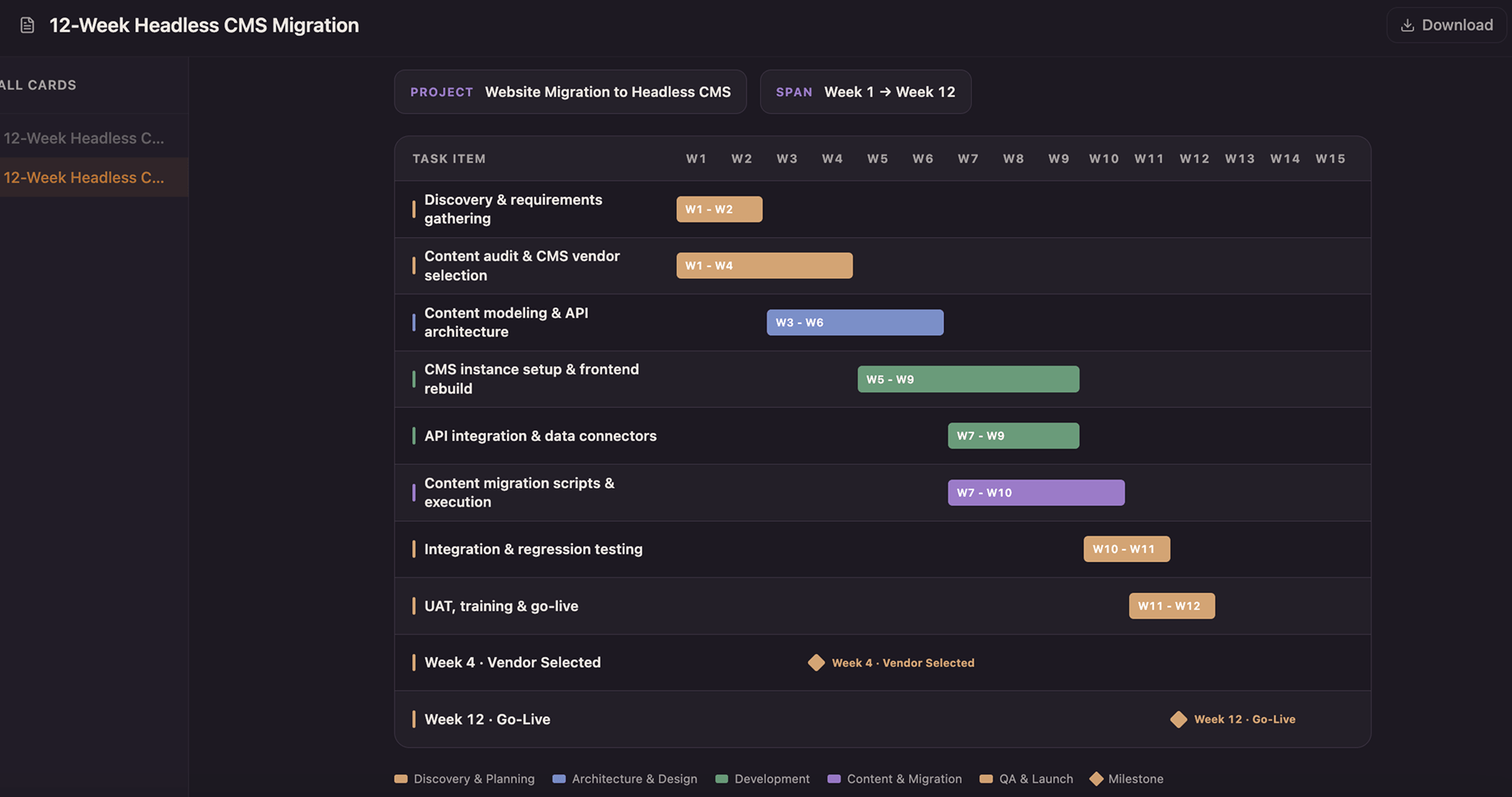
Lay every task as a solid bar across a twelve-week axis and color it by the team that owns it—copper for design, blue for build, green for test, purple for release—so a glance down any week shows who holds the schedule. Drag a bar to reschedule, snap it to whole weeks, and drop a milestone diamond on launch day.
 Tools
ToolsCreate a Gantt chart from a task list, project brief, launch plan, or schedule notes. Map start dates, end dates, durations, dependencies, task owners, progress, and milestones on a visual project timeline.
 Templates
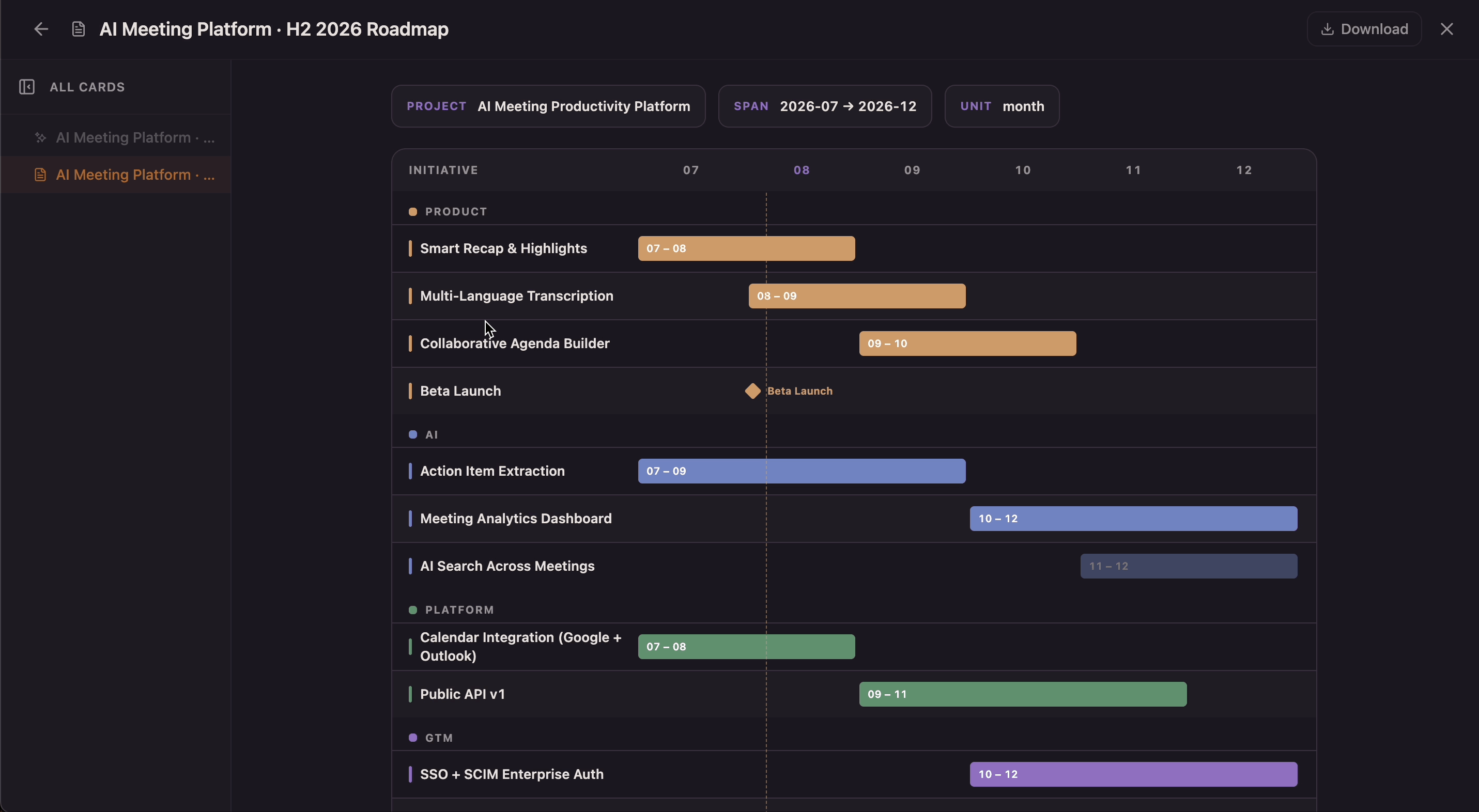
Build a visual roadmap with monthly timeline lanes, grouped initiatives, milestones, launch markers, and current-month indicators in one shared canvas. Flowacts helps teams turn strategic plans into a timeline view that stays easy to scan as priorities and dates shift.