 Tools
ToolsRoot Cause Analysis Tool
Create a concept map from a topic, lesson note, research question, product idea, or complex subject. Connect concepts, examples, causes, effects, and relationships so the structure is easier to understand.

Compare your current state with your desired future state on one editable canvas. Use this gap analysis template to identify gaps, understand root causes, prioritize actions, and track progress as your team closes the gap.
The Flowacts Gap Analysis template helps teams systematically compare where they are now with where they want to be. It includes columns for current state assessment, desired future state definition, gap identification, root cause analysis, and priority assignment across multiple capability dimensions. Flowacts helps you structure findings while your team collaborates in real-time on a shared canvas where everyone can see which gaps matter most and track closure progress together.
Most gap analyses become static spreadsheets created once for a planning cycle and never revisited. Flowacts keeps the gap assessment, root cause notes, and action priorities in one editable canvas that stays current as capabilities improve and new gaps emerge.
You can start with a rough current-state assessment, ask AI to help identify specific gaps and suggest root causes, add capability data as you gather it from teams, update gap status when improvement actions close gaps, and collaborate with stakeholders who own different capability areas. This makes the analysis useful for ongoing capability planning, not just annual reviews.
The template includes a gap analysis matrix with columns for current state assessment, desired future state, identified gaps with severity levels, root cause analysis, priority rankings, action owner assignments, and AI prompts that help analyze patterns across gaps and suggest which capabilities to prioritize first.
Use this template when planning organizational capability improvements and need to identify where gaps exist, entering a new market and want to assess readiness gaps, or preparing a strategic plan and need current gap intelligence that shows which capabilities require investment.
Click "Use Template" to open a new canvas with a gap analysis framework already prepared.
Edit the capability dimensions, assessment criteria, priority levels, and gap categories to match your organizational context and strategic goals.
Create a structured gap matrix with columns for current state, future state, identified gaps, root causes, and action priorities across your key capability areas.
Ask follow-up questions, add new capability dimensions, update gap severity ratings, or adjust priorities as you gather more data and your understanding evolves.
Skip the frustration of staring at a daunting blank canvas—our templates do the foundational setup work for you right away.
See which capability gaps matter most at a glance. Flowacts helps you score and color-code gaps by business impact, so prioritization discussions happen faster and teams align on which capabilities need immediate attention versus long-term development.
Update gap status in real-time as teams close capabilities. The canvas shows progress across all dimensions simultaneously—current state improvements, newly identified gaps, and action owner assignments—so everyone sees which areas are improving without asking for status reports.
Ask Flowacts to analyze patterns across multiple gaps and suggest underlying causes your team might have missed during initial assessment. Flowacts spots connections between capability shortfalls (like skill gaps that create process gaps) and recommends systemic fixes instead of one-off solutions.
Got a question about how this specific canvas behaves? Here is what you need to know before you get started.
Gap analysis is the process of comparing your current state with your desired future state to identify what's missing. It helps organizations understand which capabilities, resources, or processes need development to reach strategic goals.
The five steps are: assess your current state performance, define your desired future state, identify the gaps between them, analyze root causes of each gap, and develop an action plan with priorities. Some organizations add a sixth step to monitor progress as gaps close.
No. SWOT analysis examines strengths, weaknesses, opportunities, and threats broadly across your organization. Gap analysis specifically compares current capabilities to desired capabilities to pinpoint what's missing. A SWOT can feed into a gap analysis, but they serve different purposes.
Visualize gap analysis with a matrix that compares current state, desired future state, identified gaps, root causes, priorities, and actions. Flowacts shows these elements on one canvas so teams can see patterns and decide what to address first.
Common mistakes include defining the future state too vaguely, listing gaps without root causes, treating every gap as equally important, skipping owners or deadlines, and failing to update the analysis as work progresses.
A gap analysis template should include current state, desired future state, gap description, root cause, impact, priority, owner, action steps, deadline, and progress status.
Yes. Flowacts gives you the familiar structure of a gap analysis matrix, but keeps notes, priorities, owners, chat, and progress updates together on an editable canvas instead of a static spreadsheet.
Browse related template categories to find more workflows connected to this template.
Keep going with templates and tools for the same workflow.
ToolsCreate a concept map from a topic, lesson note, research question, product idea, or complex subject. Connect concepts, examples, causes, effects, and relationships so the structure is easier to understand.
 Templates
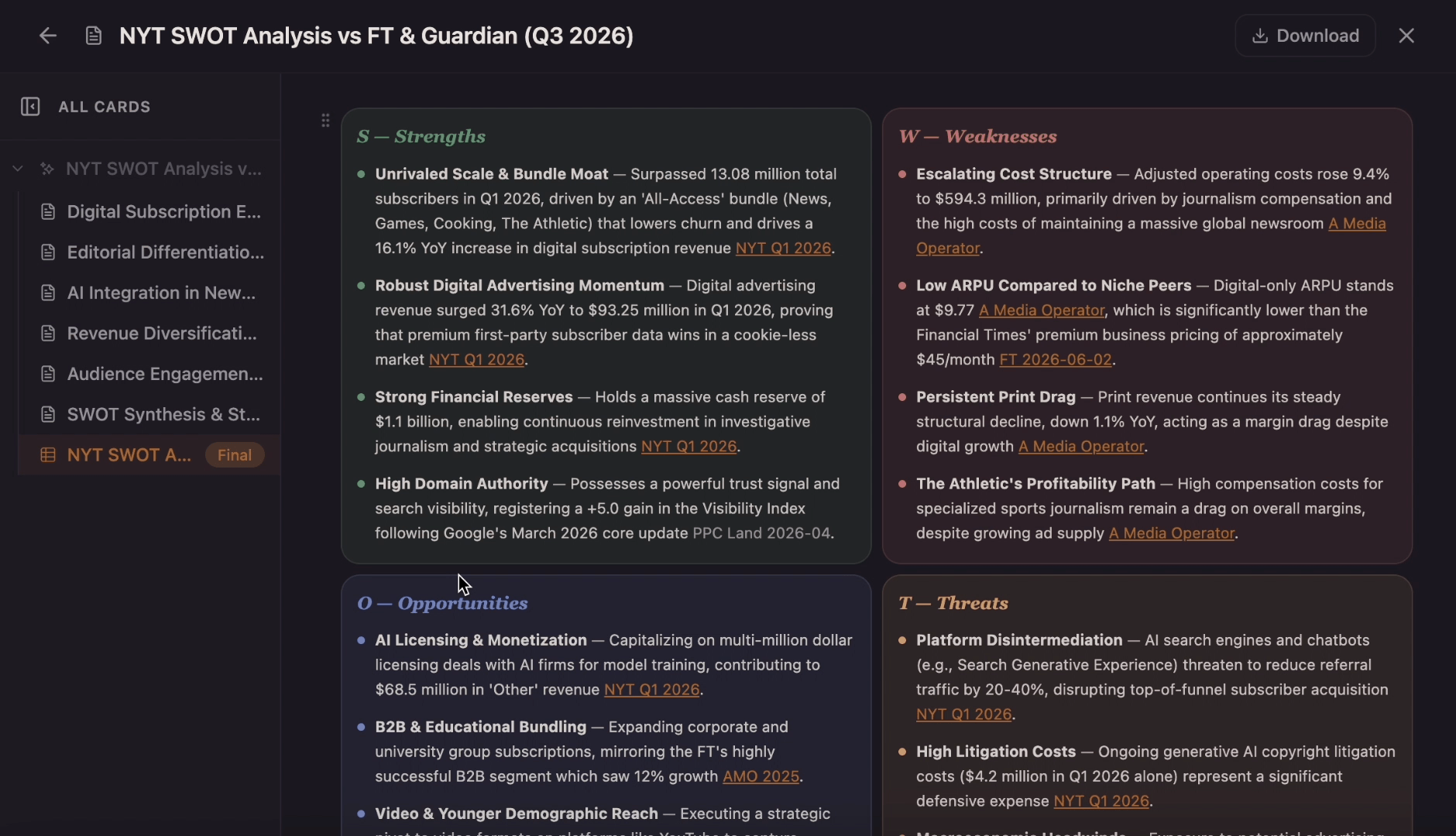
Use this template to generate a collaborative canvas that explores the internal strengths and weaknesses alongside external market opportunities and threats of your business and to better inform decisions when it comes to strategy planning, action plans, management, and your project's next steps.
 Tools
ToolsCreate a clear SWOT matrix for a business, product, project, or personal goal. Flowacts helps you separate strengths, weaknesses, opportunities, and threats so your strategy review starts with sharper evidence.
 Templates
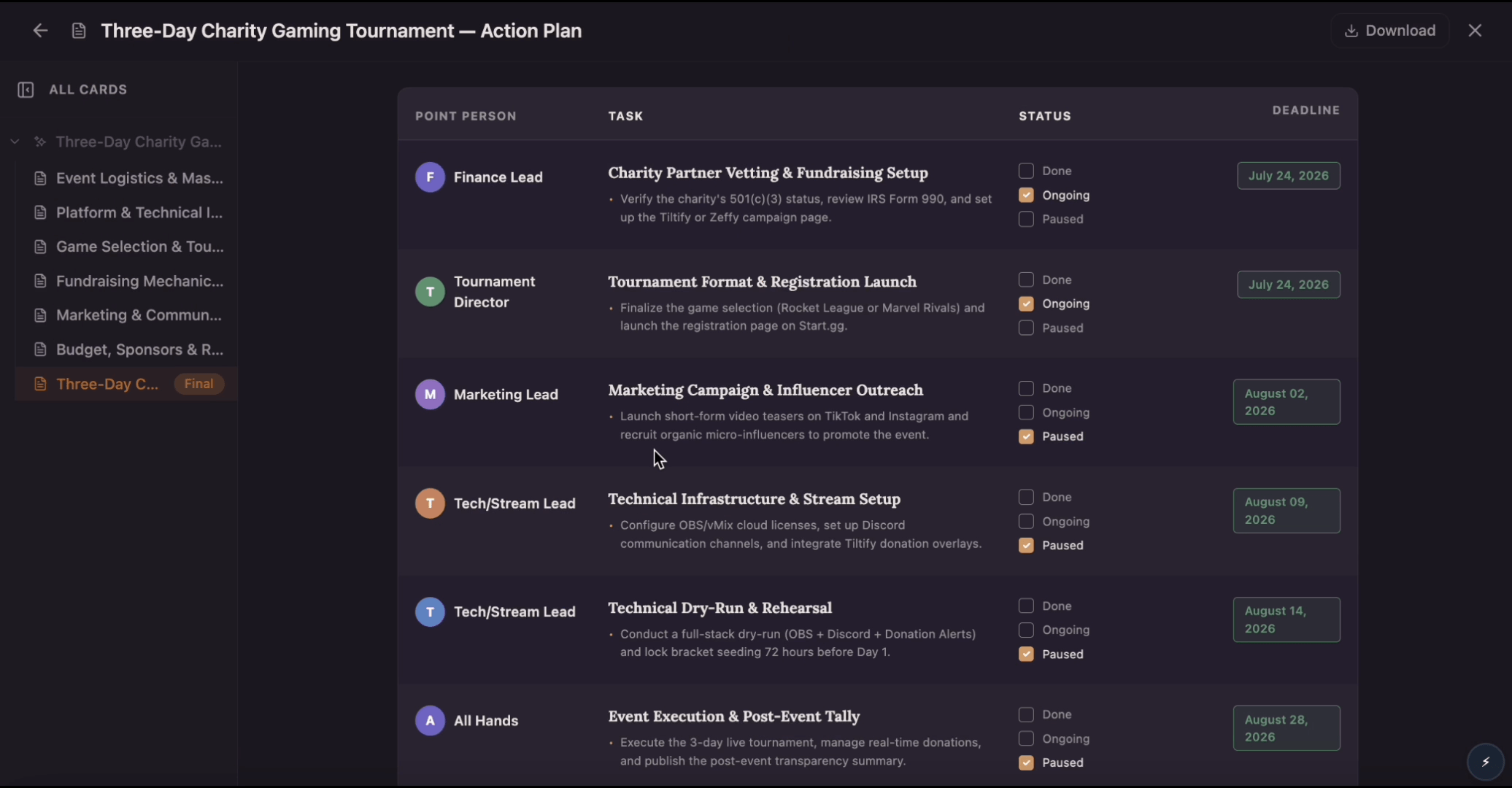
Build an action plan that turns ambitious goals into accountable work by breaking them into clear tasks with assigned owners, visible status, and real deadlines. Use this template to map out who does what by when, track progress as tasks move from planned to done, and keep everyone aligned while Flowacts organizes updates and surfaces what needs attention next.